Best VPS for Claude Code in 2027: 6 Providers Compared on RAM, Setup, and Monthly Cost


Claude Code works best when it can keep running. But on a laptop, every long task stops the moment you close the lid. And that's why you need a VPS, for the same reason any always-on AI agent belongs on a server. To help you pick the right option, we've compared six VPS providers based on the specs Claude Code actually needs, the setup work involved, and what you really pay each month.
Choose BearHost if you want dedicated vCPU and RAM at the 4 GB minimum, monthly billing with no renewal increase, and servers in the Netherlands or France. Hostinger has the lowest entry price with 4 GB RAM and a Claude Code page, but the price requires a two-year prepayment and renews at a higher price. Contabo gives the most RAM per euro on shared CPUs. Hetzner, DigitalOcean, and Vultr bill by the hour, which suits short experiments more than an agent that runs all month.
What Claude Code needs from a VPS
Anthropic publishes the minimum requirements for Claude Code. Here is what they mean on a server:
| Requirement | Anthropic's minimum | What it means for a VPS |
|---|---|---|
| RAM | 4 GB or more | Skip 1 GB and 2 GB plans. Start with at least 4 GB, then allow more room for larger projects. |
| Processor | x64 or ARM64 | Most modern VPS processors qualify, but check the architecture before ordering. Dedicated vCPU can help when builds and tests run alongside Claude. |
| Operating system | Ubuntu 20.04+, Debian 10+, Alpine Linux 3.19+, Windows Server 2019+ | A standard Ubuntu or Debian VPS is the simplest choice. Alpine requires Bash and curl to be installed separately. |
| Node.js | Node.js 22+ for npm installation | The native installer does not need Node.js. Your own project may still require it. |
| Internet connection | Required | Your VPS needs internet access to connect to Anthropic's services. |
| Shell | Bash, Zsh, PowerShell, or CMD | Bash or Zsh is the straightforward choice on a Linux VPS. |
| Account | Claude Pro, Max, Ultra, Team, Enterprise, or an Anthropic Console account | The free Claude plan does not include Claude Code. Team and Enterprise access depends on the applicable plan and seat arrangement. |
Claude Code has a modest system requirement. The heavier work comes from what you ask it to run, such as package installs, test suites, Docker containers, and development servers. A 4 GB VPS meets Anthropic's minimum, but larger projects may need more RAM and CPU capacity.
What to check before you buy a VPS for Claude Code
Check these four things before you commit financially:
RAM: 4 GB is Anthropic's minimum for Claude Code, but it leaves less room for your project tools. Go for 8 GB if you plan to run Docker, a database, or browser tests alongside Claude.
CPU allocation: Find out whether the provider gives you shared or dedicated vCPUs. Shared CPUs can be affected by activity from other customers on the same host. Dedicated vCPUs give your builds and tests a more consistent share of processing power.
Storage: Allow room for your repositories, dependencies, Docker images, logs, and project files. 40 GB is a reasonable starting point for one or two smaller projects. You may need more if you work with several containers or large codebases.
Renewal price: A low advertised rate may require you to pay for two years upfront. Check the total amount due at checkout and the regular price when that term ends. That gives you a better idea of what the VPS will actually cost.
A quick scorecard of 6 VPS providers for Claude Code
| Provider | Plan that meets the 4 GB minimum | vCPU type | Monthly price | Renewal and billing |
|---|---|---|---|---|
| BearHost | VPS Bear: 2 vCPU, 4 GB RAM, 40 GB NVMe | Dedicated | $9.49 | Monthly billing. Same price at renewal. |
| Hostinger | KVM 1: 1 vCPU, 4 GB RAM, 50 GB NVMe | Allocated vCPU with CPU credit limits | $6.49 with 24-month prepayment | Renews at $11.99/mo for another 2 years. |
| Hetzner Cloud | CPX22: 2 vCPU, 4 GB RAM, 80 GB NVMe | Shared | €16.49 base (€19.49 in some locations) | Hourly billing, capped at the monthly price. |
| DigitalOcean | Basic: 2 vCPU, 4 GiB RAM, 80 GiB SSD | Shared | $24 | Per-second billing, capped at $24 per month. |
| Vultr | Regular Performance: 2 vCPU, 4 GB RAM, 80 GB SSD | Shared | $20 | Hourly billing, capped at the monthly price. |
| Contabo | Cloud VPS 4: 4 vCPU, 8 GB RAM, 100 GB SSD | Shared | $5.28 on a 24-month term ($7.28 with auto-backup) | Check the checkout page for the applicable billing and renewal terms. |
To help you make a choice faster
- Choose BearHost if you want dedicated vCPU and RAM at the 4 GB minimum, monthly billing with no renewal increase, and servers in the Netherlands or France.
Hostinger has the lowest entry price with 4 GB RAM and a Claude Code page, but the price requires a two-year prepayment and renews at a higher price. Contabo gives the most RAM per euro on shared CPUs.
Hetzner, DigitalOcean, and Vultr bill by the hour, which suits short experiments more than an agent that runs all month.
Let's get to the list.
1. BearHost: dedicated vCPU at the 4 GB minimum, same price every month
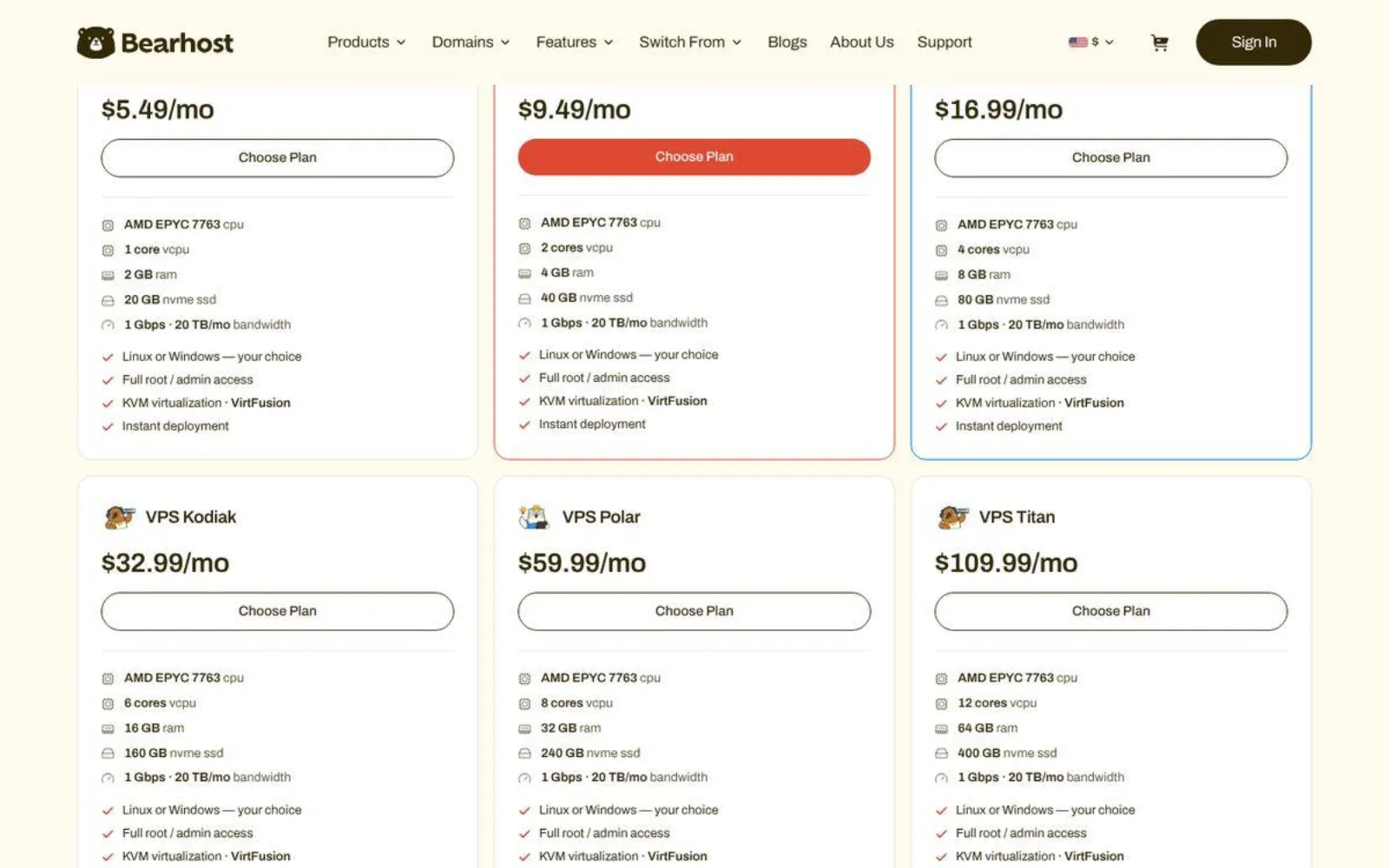
BearHost VPS hosting runs every plan on KVM with dedicated vCPU and RAM, so your Claude Code session does not slow down when other customers get busy. Each plan includes NVMe storage, a 1 Gbps port, 20 TB of monthly traffic, a dedicated IPv4 address, and full root access.
For Claude Code, start with VPS Bear. It gives you 2 dedicated vCPUs and 4 GB of RAM, which meets Anthropic's minimum, for $9.49 a month. You can run a Linux VPS with Ubuntu or Debian, or Windows Server, which is included from the Bear plan up.
BearHost VPS plans
| Plan | vCPU | RAM | NVMe | Monthly price |
|---|---|---|---|---|
| VPS Cub | 1 | 2 GB | 20 GB | $5.49 |
| VPS Bear | 2 | 4 GB | 40 GB | $9.49 |
| VPS Grizzly | 4 | 8 GB | 80 GB | $16.99 |
| VPS Kodiak | 6 | 16 GB | 160 GB | $32.99 |
| VPS Polar | 8 | 32 GB | 240 GB | $59.99 |
| VPS Titan | 12 | 64 GB | 400 GB | $109.99 |
The limitation is that BearHost's daily automated backups cost a $4.99 monthly add-on.
But if we're talking about its strong edge, monthly billing means no renewal increase, and every plan comes with a 30-day money-back guarantee. That ensures long-term affordability.
Best if: You want Claude Code running 24/7 on dedicated resources, with a predictable monthly bill and servers in Europe.
2. Hostinger: the cheapest 4 GB plan, if you prepay two years
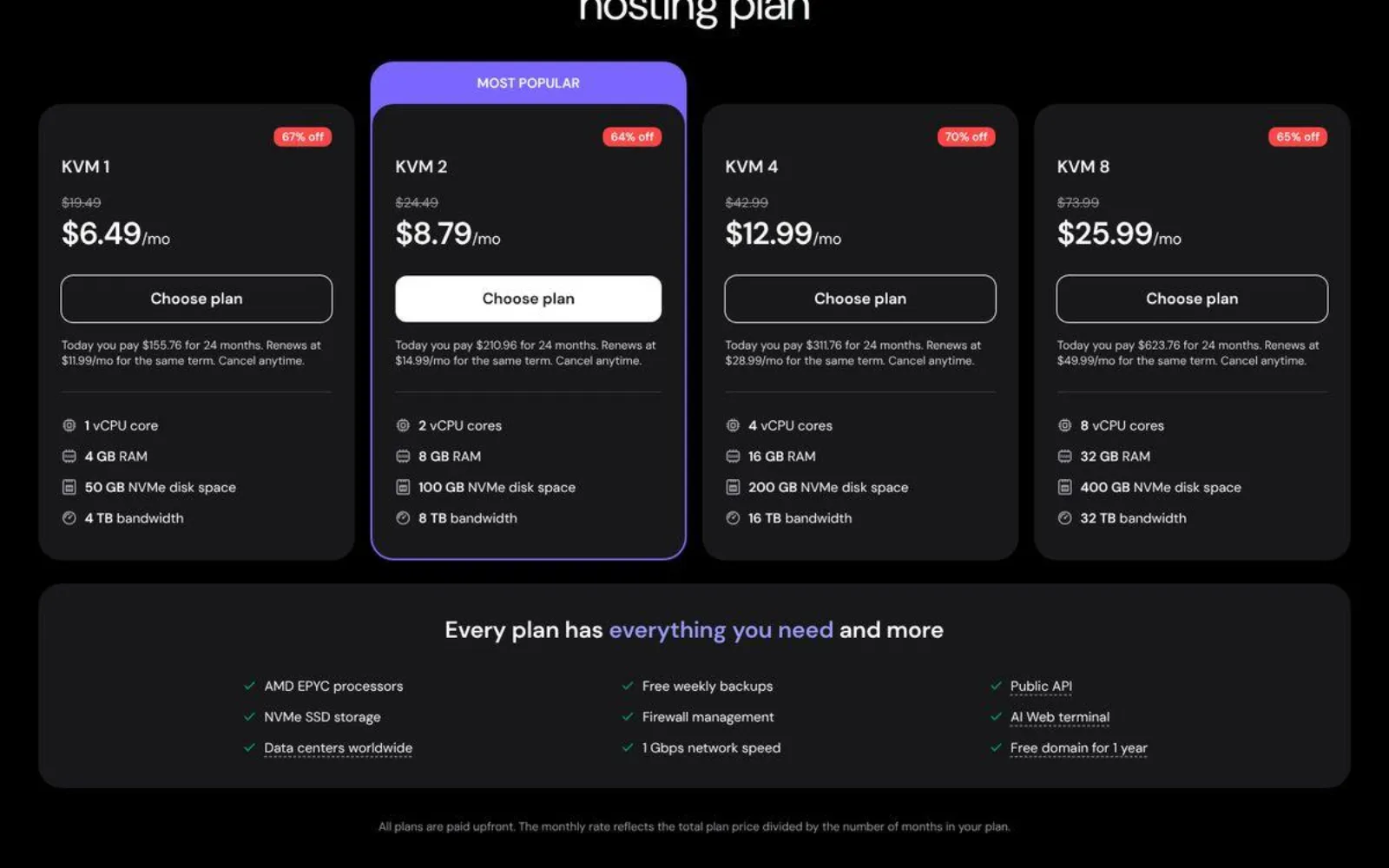
Hostinger has a dedicated Claude Code VPS page. Its KVM 1 plan gives you 1 vCPU, 4 GB RAM, 50 GB NVMe, and 4 TB bandwidth for $6.49 per month. KVM 2 doubles that to 2 vCPUs and 8 GB RAM for $8.79 per month.
Hostinger also bundles a few useful extras, such as weekly basic backups, a malware scanner, and Kodee, an AI assistant that can install dependencies and run commands for you. It also supports connecting the server to the Claude app for remote monitoring.
The catch is that both prices require 24 months paid upfront. KVM 1 then renews at $11.99 per month and KVM 2 at $14.99. KVM 1 also has a single vCPU, so builds and tests share one core with Claude Code.
Best if: You want the lowest upfront monthly rate for 4 GB or 8 GB of RAM and can commit to two years.
3. Hetzner Cloud: solid EU servers, billed by the hour
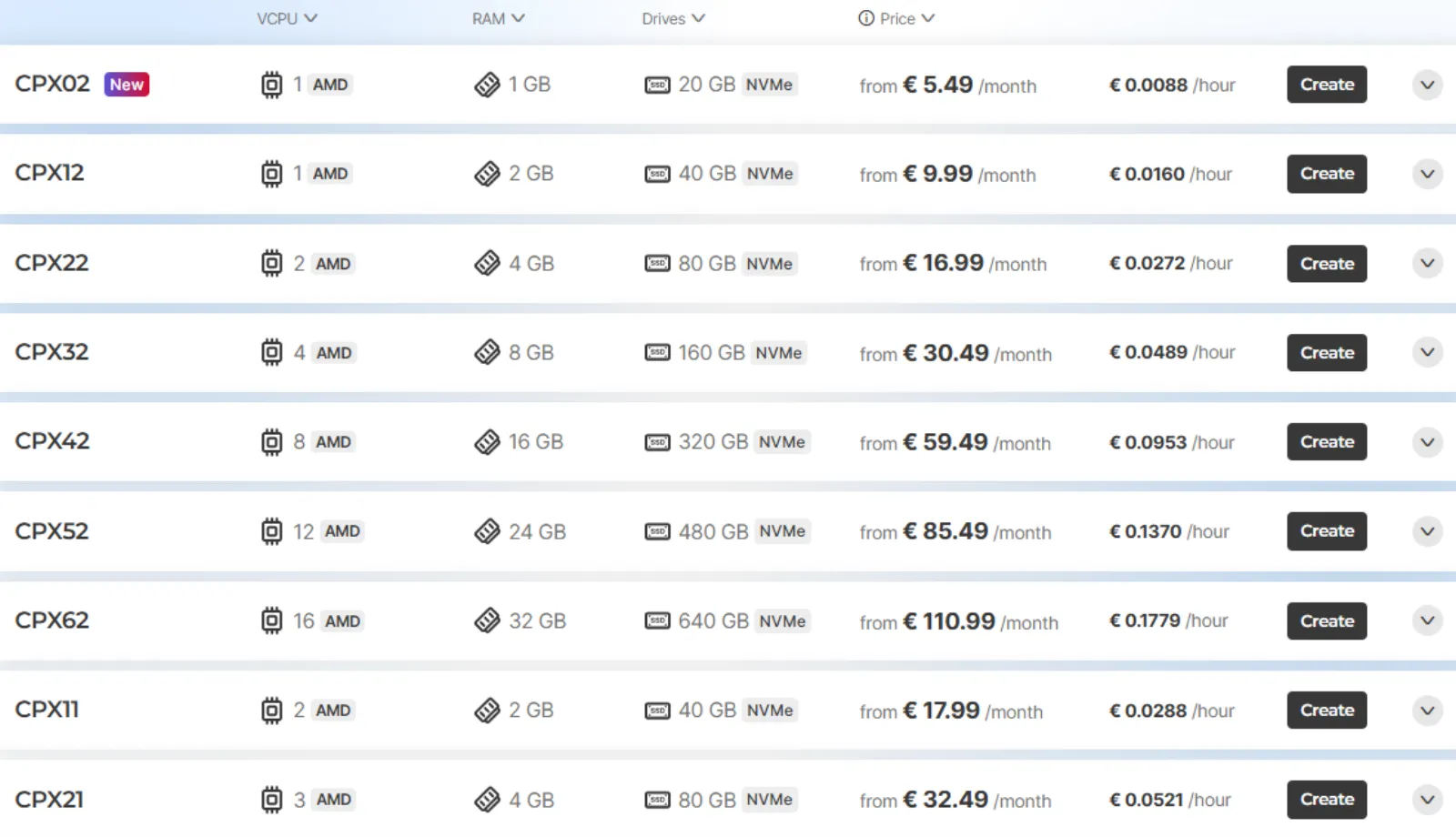
Hetzner's Regular Performance line uses AMD processors and NVMe disks. The CPX22 gives you 2 vCPUs, 4 GB RAM, 80 GB NVMe, and 20 TB of traffic. It costs €19.99 per month in Nuremberg or €16.99 in Helsinki, excluding VAT, with a public IPv4 included.
Billing is hourly with a monthly cap, which means you can delete a test server after a day and pay cents.
The catch is that these are shared vCPUs, which is much more expensive compared to paying just $9.49 for a dedicated server with BearHost. Daily backups also cost extra, and VAT is added on top for EU customers.
Best if: You want an EU Linux server with generous storage and hourly billing for experiments.
4. DigitalOcean: polished tooling at a higher price
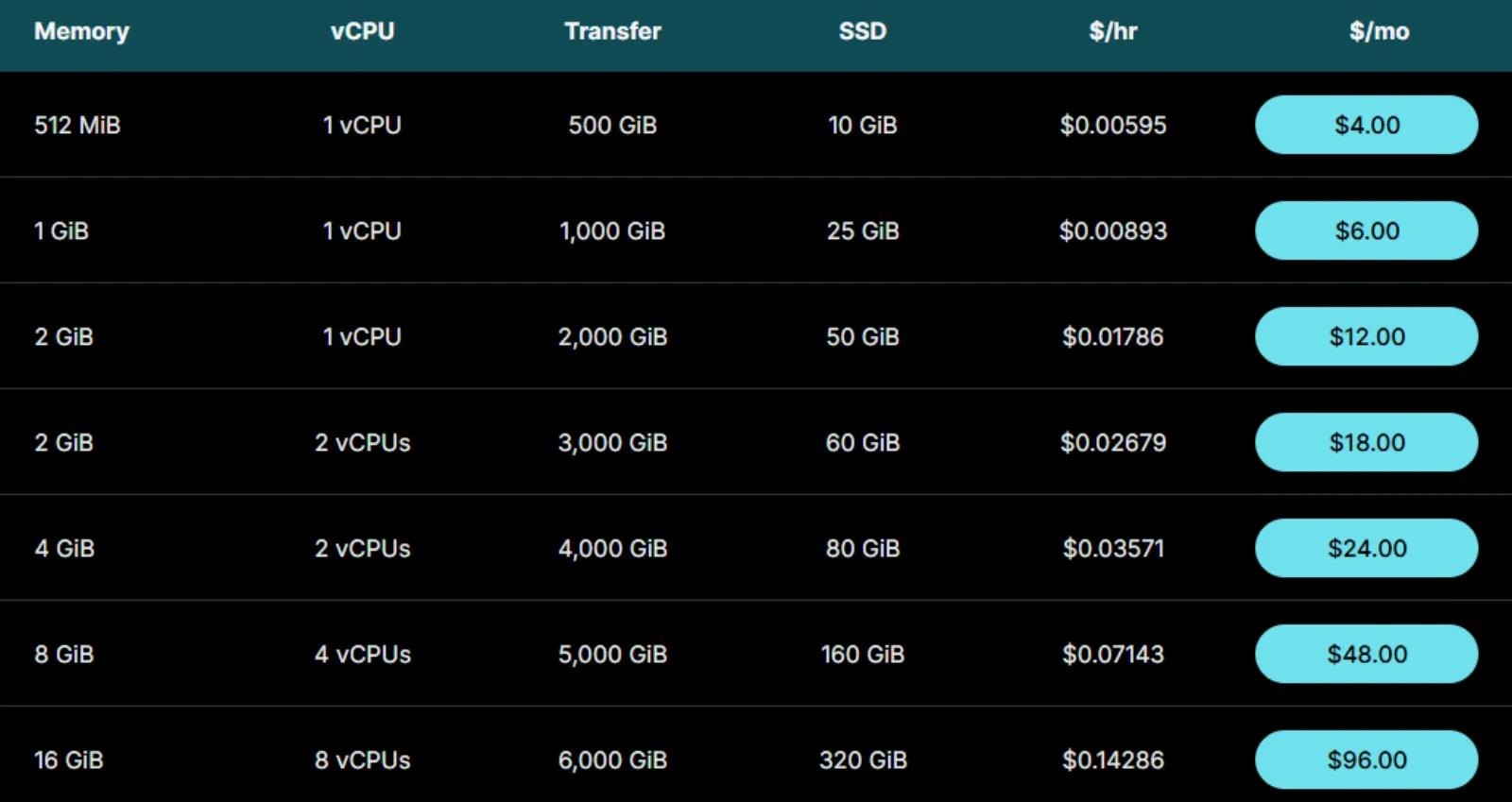
DigitalOcean's Basic Droplet with 2 vCPUs, 4 GiB RAM, 80 GiB SSD, and 4,000 GiB of transfer costs $24 per month. Its dashboard, documentation, and API are some of the easiest to use, which helps if you script your servers.
Similar to Hetzner, the catch is cost. You pay about two and a half times BearHost's price for the same vCPU and RAM count, and those vCPUs are shared. Dedicated CPU plans start at $42 per month. Backups add 20% of the Droplet price for weekly copies or 30% for daily ones.
Best if: You already use DigitalOcean's tools and want Claude Code next to your other Droplets.
5. Vultr: hourly billing with many locations
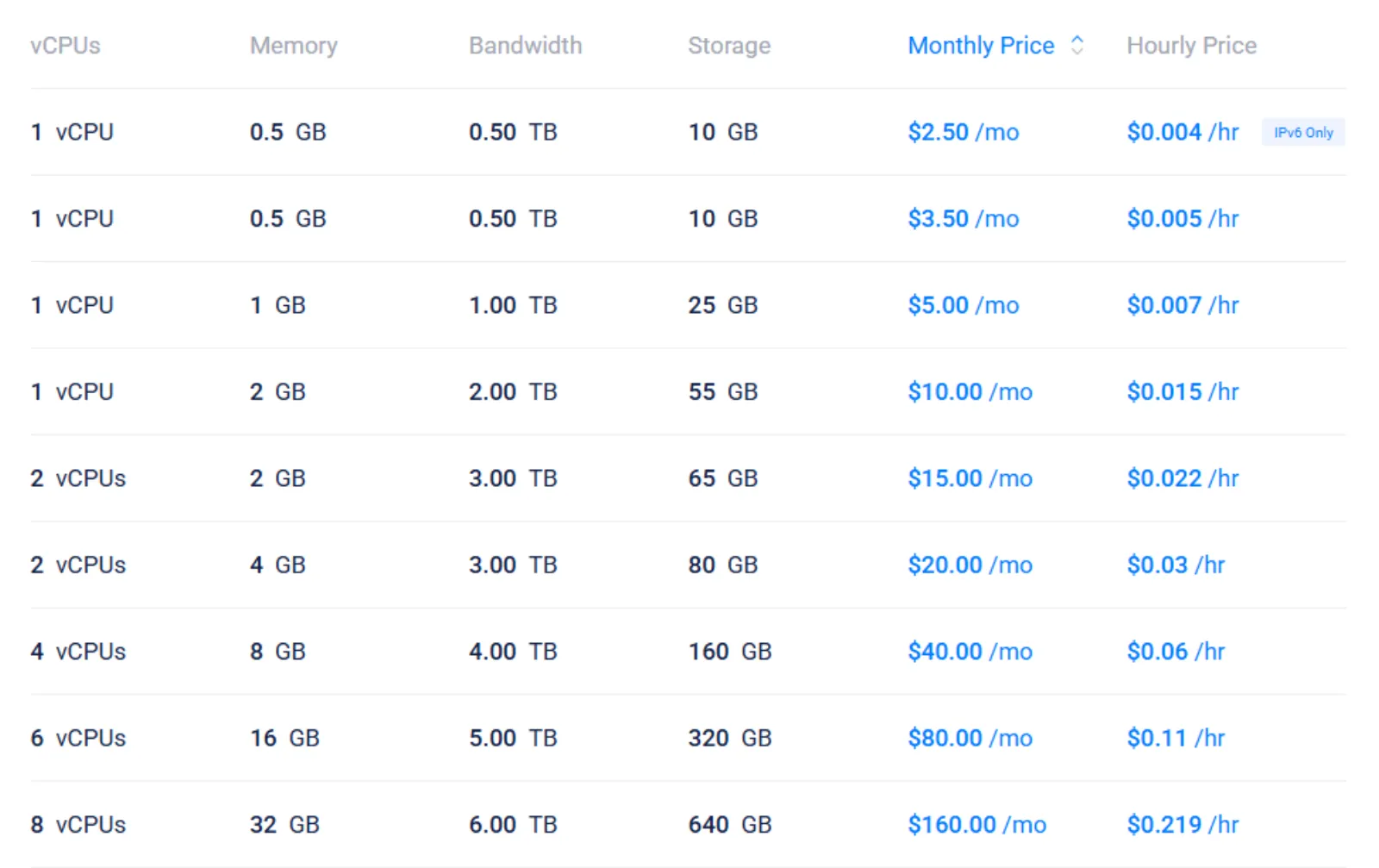
Vultr's Regular Performance plan with 2 vCPUs, 4 GB RAM, 80 GB storage, and 3 TB bandwidth costs $20 per month. The High Performance version with 100 GB NVMe costs $24. Vultr bills by the hour and has data centers on several continents.
The catch is the same as DigitalOcean. The vCPUs are shared, and Vultr's dedicated CPU Optimized plans start at $28 per month for just 1 vCPU and 2 GB RAM, which is below Claude Code's minimum. That means you'll pay more if you need something that fits.
Best if: You prefer paying per hour and need a server close to a specific region outside Europe.
6. Contabo: the most RAM per cost
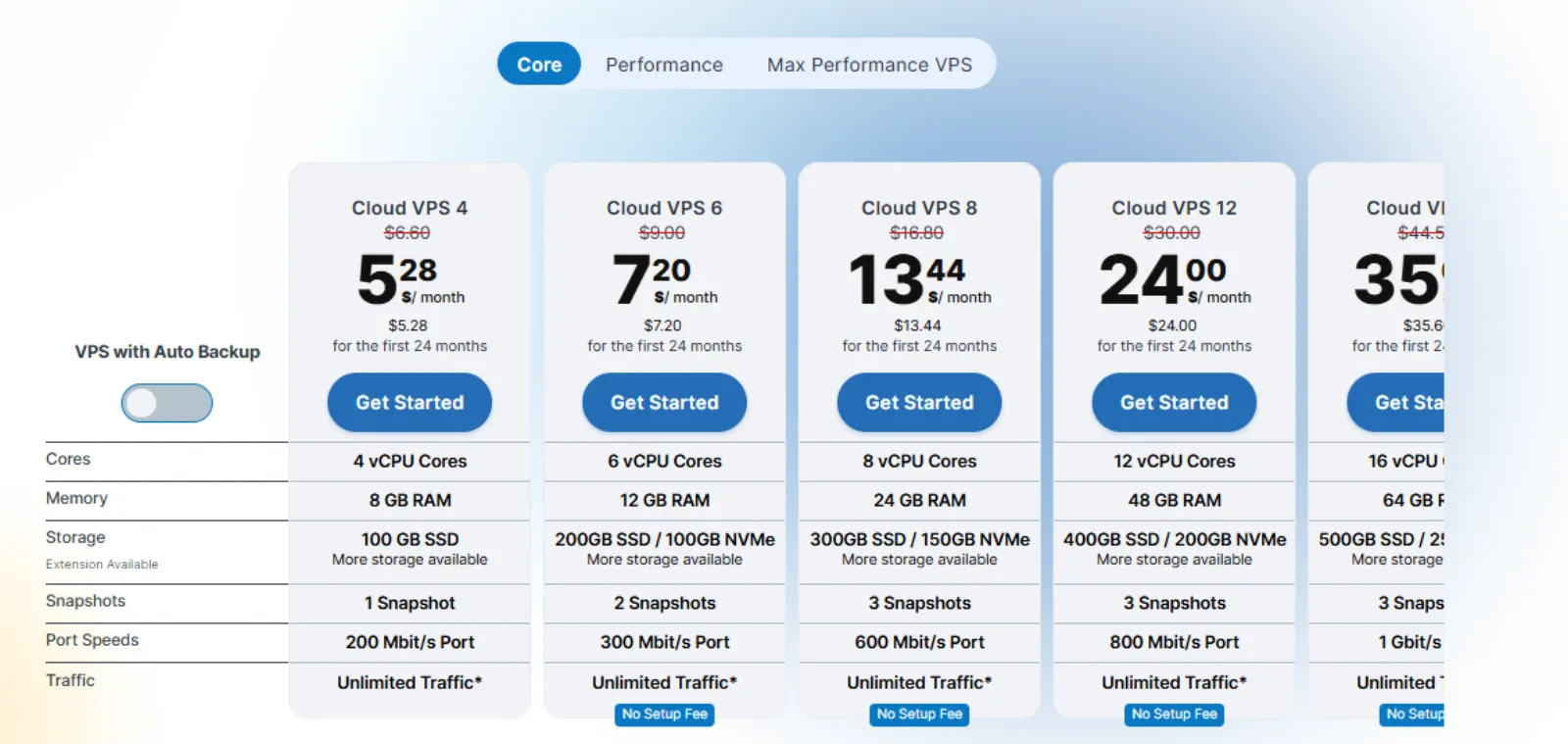
Contabo's Cloud VPS 4 gives you 4 vCPU cores, 8 GB RAM, and 100 GB SSD storage for $5.28 per month when you pay for 24 months upfront. That's twice Anthropic's minimum RAM, with enough room to run Claude Code alongside your development tools. The plan also includes a 200 Mbit/s port, one snapshot, and unlimited traffic. You can deploy it in Contabo's US Central data center.
You can also add automatic backups during checkout. That brings the monthly rate to $7.28. It's worth considering if you want an additional backup option without setting up your own backup routine.
The main limitation is that Contabo uses shared vCPUs. Your server shares physical CPU resources with other customers, so performance can vary depending on host activity. The 100 GB drive is also a standard SSD rather than NVMe, and its 200 Mbit/s port is slower than the 1 Gbps connection offered by some competitors. These are flags worth considering if you regularly build large projects or download sizable Docker images.
Best if: You want 8 GB of RAM and a low introductory price, need a US server location, and are comfortable with shared CPU resources and 24-month prepayment.
How to set up Claude Code on a VPS, step by step
Once your server is ready, running Claude Code on it takes about 10 minutes. Let's break the steps down, assuming you're using Ubuntu or Debian.
1. Connect over SSH. Use the root login from your welcome email to connect to your VPS via SSH.
2. Create a normal user. Do not run Claude Code as root. Create a user and give it sudo access, then log in as that user:
adduser dev
usermod -aG sudo dev
3. Update the server and install the basics.
sudo apt update && sudo apt upgrade -y && sudo apt install -y git tmux curl4. Install Claude Code. Use the native installer, which does not need Node.js:
curl -fsSL https://claude.ai/install.sh | bashThen check the installation:
claude doctor5. Start a persistent session. Open a tmux session, move into your project folder, and run Claude Code:
tmux new -s claude
cd ~/your-project
claude
Follow the login prompt, which gives you a URL to open in your browser.
6. Detach and come back later. Press Ctrl+b, then d, to leave Claude Code running. Reconnect any time with:
tmux attach -t claudeBefore you leave the server running, lock it down. Use SSH keys instead of passwords, turn on a firewall, and follow standard server security hardening steps. If this is your first server, read a guide on setting up VPS hosting before you hand it to an agent.
What a Claude Code VPS really costs per month
Note that you're paying for two separate bills, one for the server and one for Claude. Here's a summary table containing both:
| Cost | What it covers | Monthly price |
|---|---|---|
| BearHost VPS Bear | The server: 2 vCPU, 4 GB RAM, 40 GB NVMe | $9.49 |
| Claude Pro | Claude Code access with Pro usage limits | $20 monthly, or $17 billed annually |
| Claude Max | Higher usage limits for heavy daily use | $100 |
| Console API | Pay per token instead of a subscription | Usage based |
For most solo developers, VPS Bear plus Claude Pro comes to about $29.49 a month. If Claude Code becomes your main tool and you hit Pro limits, Max is the next step. Your server cost stays the same regardless.
Frequently Asked Questions
Conclusion
Every provider here can run Claude Code, but they differ in what you pay over time and whether your vCPUs are your own. Hostinger has the lowest 4 GB entry price, but it requires a two-year prepayment and renews at a higher rate. Contabo offers the most RAM per euro on shared CPUs. Hetzner, DigitalOcean, and Vultr bill by the hour, which suits short tests more than an always-on agent. For a broader look beyond Claude Code, see our best VPS hosting comparison. BearHost takes a simpler route. VPS Bear gives Claude Code 2 dedicated vCPUs and 4 GB of RAM for $9.49 a month, with no renewal increase, full root access, a dedicated IPv4 address, and a 30-day money-back guarantee. If your projects grow, move up to Grizzly without changing providers. Ready to keep Claude Code running 24/7? Explore BearHost's VPS plans.