Best NVMe VPS Hosting in 2026: 7 Providers Compared on Disk Speed, Price, and Renewal


NVMe storage is now a common tag on most VPS plans, but not every provider delivers the same disk performance and promise that comes with the storage. That's why we compared seven NVMe VPS providers on storage specs, published speeds, IOPS limits, pricing, and renewal costs to help you find the right plan.
Choose BearHost if you want strong NVMe performance, no artificial IOPS caps, and predictable monthly pricing from $5.49/mo, with the option to add up to 500 GB of extra NVMe without changing plans. Contabo gives you the most NVMe per dollar but had the slowest public benchmark, Hostinger has strong numbers if you prepay two years, Vultr and RamNode suit hourly billing, Hetzner suits EU Linux workloads, and KnownHost includes two IPv4 addresses with a path to managed hosting.
NVMe SSD vs SATA SSD vs HDD
| Storage type | Full meaning | How it works | Speed |
|---|---|---|---|
| NVMe SSD | Non-Volatile Memory Express Solid State Drive | Stores data on flash memory, with no moving parts. | Usually the fastest, especially when handling many small requests. |
| SATA SSD | Serial Advanced Technology Attachment Solid State Drive | Also uses flash memory, but connects through an older, slower interface. | Faster than an HDD, but generally slower than NVMe. |
| HDD | Hard Disk Drive | Stores data on spinning magnetic disks with moving parts. | Usually the slowest, especially when accessing many small files. |
NVMe, SATA SSD, and HDD are different storage types. Here is what separates them.
Both NVMe and SATA SSDs use flash memory, while HDDs use moving parts to read and write data, which makes them slower when handling frequent storage requests.
Of course, actual VPS performance still depends on the provider's hardware and resource allocation, not just the storage type.
What to check before you buy an NVMe VPS
Drive type. Make sure the plan specifically includes NVMe storage. Some providers offer NVMe on certain plans and regular SSD on cheaper ones.
IOPS limits. BearHost has no artificial IOPS caps, but other providers may restrict how many read and write operations your VPS can perform.
RAID and backups. RAID provides redundancy if a physical drive fails, but it does not replace backups. Hostinger includes weekly backups, KnownHost's unmanaged VPS plans do not include backups, and BearHost offers automated off-site backups as an optional add-on.
Storage capacity and upgrade costs. Check how much NVMe storage comes with your plan and what extra space costs. BearHost offers additional 50 GB, 100 GB, 250 GB, and 500 GB options for $4.99, $8.99, $19.99, and $37.99 per month, respectively.
A quick scorecard of 7 NVMe VPS providers
| Provider | Entry price | NVMe at entry | Published speed or benchmark | Renewal and billing |
|---|---|---|---|---|
| BearHost | $5.49/mo | 20 GB | 3 to 7 GB/s sequential reads. No IOPS cap | Same price, monthly |
| Vultr | $6/mo | 25 GB | 55.6k 4K read IOPS | Hourly, capped monthly |
| Hetzner Cloud | €5.49/mo, excl. VAT and IPv4 (CX23) | 40 GB | 35.9k 4K read IOPS | Hourly, capped monthly |
| Hostinger | $6.49/mo, 24-month prepayment | 50 GB | 60.5k 4K read IOPS | $11.99/mo renewal |
| RamNode | $14/mo (Premium) | 80 GB | 16.7k 4K read IOPS | Hourly billing, capped monthly |
| KnownHost | $5/mo | 25 GB | Not disclosed | Same price, monthly |
| Contabo | $7.20/mo (Cloud VPS 6, 24-month offer) | 100 GB | 15.9k 4K read IOPS | $9/mo renewal |
To help you make a choice faster
- Choose BearHost if you want strong NVMe performance, no artificial IOPS caps, and predictable monthly pricing. You can also expand storage without changing your VPS plan.
Contabo gives you 100 GB NVMe and 12 GB RAM, while Hostinger offers 50 GB NVMe and 4 GB RAM at a lower introductory price.
Vultr and RamNode offer hourly billing, Hetzner has low-priced European options billed in euros, and KnownHost includes two dedicated IPv4 addresses on its entry plan.
1. BearHost: verifiable NVMe speeds, no IOPS caps, same price at renewal
BearHost NVMe VPS hosting uses enterprise NVMe drives with power loss protection. The hosting comes with sequential read speeds of 3 to 7 GB/s, sub-millisecond tail latency on 4K random reads, and no artificial IOPS caps.
Every plan runs on AMD EPYC 7763 CPUs with KVM isolation, RAID on the host nodes, a 1 Gbps port, and 20 TB of monthly bandwidth. You get a dedicated IPv4 address, full root access, and the option to run Windows or a Linux VPS. Monthly billing also means no renewal price increase.
BearHost NVMe VPS plans
| Plan | vCPU | RAM | NVMe | Monthly price |
|---|---|---|---|---|
| VPS Cub | 1 | 2 GB | 20 GB | $5.49 |
| VPS Bear | 2 | 4 GB | 40 GB | $9.49 |
| VPS Grizzly | 4 | 8 GB | 80 GB | $16.99 |
| VPS Kodiak | 6 | 16 GB | 160 GB | $32.99 |
| VPS Polar | 8 | 32 GB | 240 GB | $59.99 |
| VPS Titan | 12 | 64 GB | 400 GB | $109.99 |
The only limitation is the included storage on the smaller plans. For example, VPS Cub starts with only 20 GB.
But you don't have to upgrade to a larger CPU and RAM configuration just to get more disk space. BearHost offers additional NVMe storage as monthly add-ons:
BearHost additional NVMe storage add-ons
| Additional NVMe | Monthly price |
|---|---|
| 50 GB | $4.99 |
| 100 GB | $8.99 |
| 250 GB | $19.99 |
| 500 GB | $37.99 |
Best if: You want NVMe with published performance figures, no artificial IOPS caps, and predictable monthly pricing, with the flexibility to add up to 500 GB of extra storage.
2. Vultr: NVMe on two cloud lines, billed by the hour

Vultr offers NVMe storage through its High Performance and High Frequency plans. The AMD High Performance entry plan costs $6 per month for 1 vCPU, 1 GB RAM, 25 GB NVMe, and 2 TB bandwidth. High Frequency also starts at $6, with 1 vCPU, 1 GB RAM, 32 GB NVMe, and 1 TB bandwidth.
Its High Performance 8 GB server has 55,600 read IOPS and 1.48 GB/s sequential read speeds. That's significantly below BearHost's 3 to 7 GB/s sequential read speed.
Another drawback is that automatic backups cost an extra 20% of the server price and exclude attached Block Storage. You also pay $0.01 per GB when you exceed your bandwidth allowance.
Best if: You want NVMe VPS hosting with hourly billing and the flexibility to create and remove servers as your workload changes.
3. Hetzner Cloud: low EU prices with NVMe on every plan
Hetzner's Regular Performance VPS plans use shared AMD processors and NVMe storage. The CPX11 gives you 2 vCPUs, 2 GB RAM, 40 GB NVMe, and 1 TB of monthly traffic for €17.49 per month, excluding VAT and IPv4. You also get hourly billing with a monthly price cap, so you only pay for the time your server exists.
The CPX22 has about 35,900 read IOPS on 4K mixed tests and 1.66 GB/s sequential read speeds, so let's say half of that for CPX11. Of course, that's still lower than BearHost's sequential read speeds of 3 to 7 GB/s.
The catch is the traffic allowance and add-on costs. CPX11 includes just 1 TB of monthly traffic, compared with 2 TB on Vultr, 4 TB on Hostinger, and 6 TB on RamNode. Daily backups cost another 20% of the server price, while a public IPv4 address adds €0.50 per month. With both, your monthly bill rises to about €21.49 before VAT. The plan also uses shared CPU resources, so performance can vary under sustained workloads.
Most importantly, CPX11 is currently marked unavailable for new orders. You need to purchase a higher-priced plan.
Best if: You want Hetzner's NVMe infrastructure and hourly billing for lighter Linux workloads, and can work with its traffic allowance and availability.
4. Hostinger: lots of NVMe for the money, if you prepay two years
Hostinger's KVM 1 gives you 1 vCPU, 4 GB RAM and 50 GB of NVMe for $6.49/mo, and KVM 2 doubles that for $8.79/mo. Every plan lists AMD EPYC CPUs, a 1 Gbps network and free weekly backups.
Hostinger publishes no disk figures, but a VPSBenchmarks trial on KVM 2 in Düsseldorf (October 10, 2026) is the strongest recent public result here: about 60,500 read IOPS (242.1 MB/s) on the 4K mixed test and about 2.8 GB/s reads at 1 MB blocks.
The catch is the commitment. The $6.49 rate is a 24-month plan paid upfront, $155.76 in total for KVM 1, and it renews at $11.99/mo. Our Hostinger pricing breakdown covers the renewal math.
Best for: You want plenty of NVMe and RAM per dollar, plan to stay two years, and accept a higher renewal price.
5. RamNode: NVMe on the Premium line, hourly billing
RamNode splits storage by tier. Standard VPS uses SSD from $4/mo. NVMe comes with Premium VPS, from $14/mo for 2 cores, 2 GB RAM, 80 GB of NVMe and 6 TB of bandwidth, IPv4 included, billed hourly with no contract. A $2/mo NVMe Lite tier exists too, but it is IPv6-only unless you add IPv4 for $2/mo.
RamNode publishes no speed figures, and the newest public result we found is old: a VPSBenchmarks trial on KVM Premium 4GB in Georgia, USA (May 28, 2022) recorded about 16,700 read IOPS (67.07 MB/s) on the 4K mixed test and 1.26 GB/s reads at 1 MB. That is the catch: a 2022 result may not reflect today's hardware.
Best for: You want hourly NVMe with 80 GB on the first Premium tier and will benchmark it yourself before you commit.
6. KnownHost: NVMe with two IPs and a managed path

KnownHost runs every VPS on enterprise NVMe in AMD EPYC 9000 series servers, in Atlanta, Seattle and Amsterdam. Unmanaged Entry lists 1 core, 1 GB RAM, 25 GB of NVMe, 2 TB of bandwidth and two dedicated IPv4 addresses from $5/mo. Entry Plus gives you 2 cores, 2 GB and 50 GB for $10/mo. Managed plans with cPanel, Plesk or DirectAdmin are also offered.
We found no public benchmark, and KnownHost publishes no plan-level speeds. Its NVMe VPS page (vendor claim) quotes about 640,000 IOPS and 3,200 MB/s for NVMe against 10,000 IOPS and 550 MB/s for SATA SSD. Those describe drives in general, not a KnownHost VPS.
The catch is backups: unmanaged plans include none, and JetBackup costs $8.95/mo. A 30-day money-back guarantee is listed on all plans, so you have time to test the disk.
Best for: You want NVMe from a US host with two IPv4 addresses and the option to move to managed hosting later.
7. Contabo: the most NVMe per dollar, the slowest benchmark here
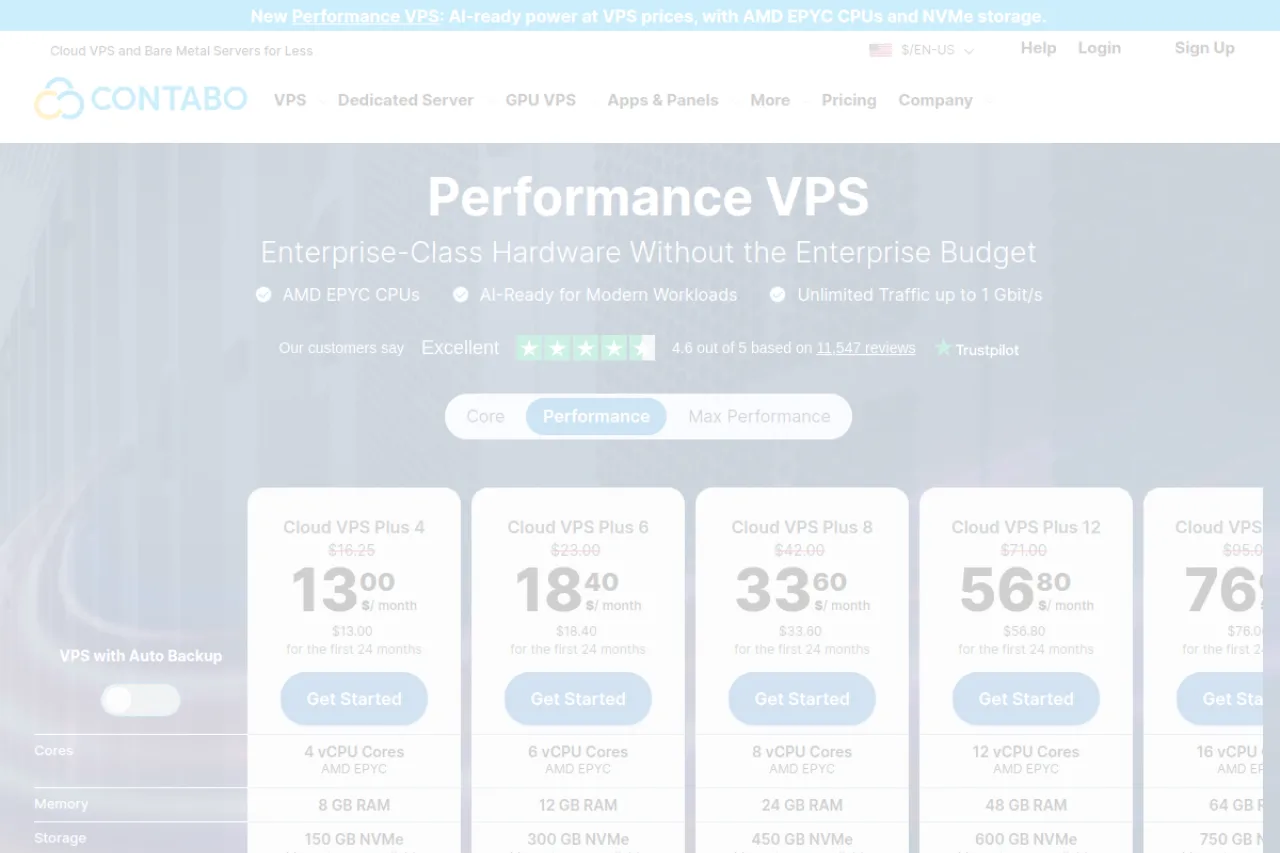
Contabo's cheapest Core plan, Cloud VPS 4 at $5.28/mo, is SSD only. NVMe starts at Cloud VPS 6: 6 vCPU, 12 GB RAM and 100 GB of NVMe (or 200 GB SSD) with a 300 Mbit/s port for $7.20/mo. The Performance line is NVMe throughout, from $13.00/mo for Cloud VPS Plus 4 with 4 AMD EPYC vCPU, 8 GB RAM, 150 GB of NVMe and a 500 Mbit/s port.
These are effective monthly rates on a 24-month subscription. The minimum contract is one month, so check the cart total for shorter terms.
Contabo publishes no disk figures. A VPSBenchmarks trial on Cloud VPS Plus 4 in Lauterbourg, France (July 26, 2026) recorded about 15,900 read IOPS (63.8 MB/s) on the 4K mixed test and about 535 MB/s reads at 1 MB blocks. That is the catch: the lowest result in this list on both small and large blocks.
Best for: You need a lot of disk and RAM for little money, for staging, backups or file storage where speed comes second.
Cheap NVMe VPS: the lowest price per GB of NVMe
| Provider | Entry NVMe plan | NVMe | Price | Per GB |
|---|---|---|---|---|
| Contabo | Cloud VPS 6 | 100 GB | $7.20/mo (24-month rate) | About $0.07 |
| Hostinger | KVM 1 | 50 GB | $6.49/mo (24-month prepay) | About $0.13, $0.24 at renewal |
| RamNode | Premium 2GB | 80 GB | $14/mo | About $0.18 |
| Vultr | High Frequency | 32 GB | $6/mo | About $0.19 |
| KnownHost | Entry | 25 GB | $5/mo | $0.20 |
| BearHost | VPS Cub | 20 GB | $5.49/mo | About $0.27 |
| Hetzner Cloud | CPX02 | 20 GB | €6.49/mo excl. VAT | About €0.32 |
If space is your main need, divide each entry price by its NVMe allocation.
Contabo wins on raw space, and Hostinger is strong until renewal. BearHost's entry plan sits low on this metric, but add-ons change the math: VPS Cub plus 250 GB of extra NVMe is $25.48/mo for 270 GB, about $0.09 per GB, paid monthly. For value beyond disk, see our cheap VPS roundup or BearHost's cheap VPS hosting plans.
Who actually needs NVMe, and who does not
Databases. MySQL and PostgreSQL live on 4K random I/O, so latency and IOPS matter more than sequential speed.
WooCommerce and busy WordPress. Carts and logged-in pages skip the page cache, so every request hits the database and the disk.
CI builds. Dependency installs and compiles write thousands of small files.
Docker. Image pulls and layer extraction are disk-heavy.
A fast NVMe VPS pays off when your server makes many small, random reads and writes, as in the cases above. You can skip paying extra for NVMe for a static site behind a CDN, a VPN, a small bot, or backups and archives, which need capacity rather than speed. Our website loading speed benchmarks cover what else affects page speed.
How to benchmark your own VPS disk, step by step
You need about 2 GB of free disk. Use a fresh server, not a busy production database.
1. Connect to your server. Log in over SSH as root or a sudo user.
2. Install fio. On Ubuntu or Debian:
sudo apt update && sudo apt install -y fioOn AlmaLinux or Rocky Linux:
sudo dnf install -y fio3. Run a 4K random read/write test. This matches the YABS mix, queue depth and job count, so you can compare with the results above.
fio --name=rand4k --filename=fio-test --size=2G --direct=1 --ioengine=libaio --rw=randrw --rwmixread=50 --bs=4k --iodepth=64 --numjobs=2 --runtime=30 --time_based --group_reporting4. Run a sequential read test.
fio --name=seqread --filename=fio-test --size=2G --direct=1 --ioengine=libaio --rw=read --bs=1M --iodepth=16 --runtime=30 --time_based --group_reporting5. Read the IOPS and bandwidth lines. On the "read:" and "write:" lines, IOPS= is operations per second and BW= is throughput. For tail latency, check the 99.00th value under clat percentiles.
6. Run each test three times and take the median. Neighbours and caching shift results, so the median is fairer than the best run. Then delete the test file:
rm fio-testFrequently Asked Questions
Conclusion
Every host here sells NVMe, but they publish very different amounts about it. Contabo gives the most space per dollar but had the slowest benchmark, Hostinger has strong public numbers if you prepay two years, Vultr and RamNode suit hourly billing, Hetzner suits EU Linux workloads, and KnownHost suits buyers who may want managed hosting later. For a broader look beyond disk speed, see our best VPS hosting comparison. BearHost puts enterprise NVMe with published speeds and no IOPS caps on every VPS plan, from $5.49/mo, billed monthly, with the same price at renewal. Ready for an NVMe VPS? Start here.