Best WordPress Hosting for Beginners in 2026: 6 Hosts Compared on Setup, Support, and Renewal


Choosing WordPress hosting for your first website can be tricky. Some providers advertise prices below $3 per month, but require a year or more of prepayment. Others offer monthly billing but raise the price when your introductory term ends. In some cases, you get a really low introductory price but sacrifice basic features until you pay premium.
To help you avoid that, we compared six WordPress hosts to see what you actually get for your money, from setup and storage to backups, upfront costs, and renewal prices. We also looked at which providers keep their prices consistent after the first year.
What a beginner actually needs from WordPress hosting
You do not need server management or developer tools for your first website. You need a host that handles the basics:
| Feature | Why it matters for a beginner |
|---|---|
| WordPress preinstalled or one-click installation | You can start building without configuring WordPress manually. |
| Automatic updates | Security updates fix known vulnerabilities and reduce manual maintenance. |
| Daily backups | You can restore a recent copy if an update or change breaks your website. |
| Free SSL | Encrypts connections between your website and visitors and enables HTTPS. |
| Email on your domain | An address like name@yourbusiness.com gives your business a professional email identity. |
| Free migration | The host can help move your website if you switch providers. |
| A refund window | Gives you time to test the hosting service and request a refund if it does not meet your needs. |
What to check before you buy
Check these four things before entering your payment details:
What you pay at checkout: Some low prices require 12 to 48 months of prepayment. Check the total rather than focusing only on the monthly equivalent.
The renewal price: A cheap first year can become expensive at renewal. Check the regular rate before choosing a plan. Of course, BearHost offers a flat price, so no renewal hike.
What the free domain includes: Most offers cover only the first year. Domain registration fees may also be excluded from hosting refunds.
Backup frequency: Daily backups give you a more recent restore point than weekly backups. Also check how long the host keeps backup copies.
A quick scorecard of 6 WordPress hosts for beginners
| Host | Entry plan | First year price | Paid upfront | Renewal price | Backups |
|---|---|---|---|---|---|
| BearHost | WordPress Cub: 1 site, 20 GB NVMe | $3.49/mo or $19.99 with annual promo | $3.49 monthly or $19.99 annually with code | $3.49/mo or $34.99/year | Daily |
| Hostinger | Premium: 3 sites, 20 GB SSD | $1.99/mo | $23.88 (12 months) | $10.99/mo | Weekly |
| Bluehost | Starter: 10 sites, 10 GB NVMe | $4.24/mo | $50.88 (12 months) | $11.99/mo | Weekly |
| SiteGround | StartUp: 1 site, 10 GB storage | $3.99/mo | $47.88 (12 months) | $17.99/mo | Daily |
| DreamHost | Launch: 25 sites, 25 GB NVMe | $2.89/mo | $34.68 (12 months) | $10.99/mo | Daily |
| Namecheap EasyWP | Starter: 1 site, 10 GB NVMe | $3.24/mo | $38.88 (12 months) | $5.74/mo | Daily automatic |
To help you make a choice faster
- Choose BearHost if you want WordPress hosting without a long commitment or a steep renewal increase. Its Cub plan includes 20 GB NVMe storage, daily backups, automatic updates, email, and free SSL. You can pay monthly at $3.49 or use code WPFIRSTYEAR to pay $19.99 for the first year. It renews at $34.99 annually, and that regular price does not increase.
Hostinger, Bluehost, SiteGround, and DreamHost have attractive first-year prices, but their renewals range from $10.99 to $17.99 per month, which is 2x to 4x the introductory price.
Namecheap EasyWP is a straightforward option for one small website, but its annual renewal rises to $68.88.
- Storage is another difference. BearHost gives you 20 GB NVMe on its entry plan, compared with 10 GB NVMe on Bluehost and Namecheap and 10 GB storage on SiteGround. Hostinger lists 20 GB SSD, while DreamHost offers 25 GB NVMe. BearHost also lets you purchase additional storage and email accounts as your needs grow.
Let's get to the list.
1. BearHost: WordPress ready in minutes, no long prepayment
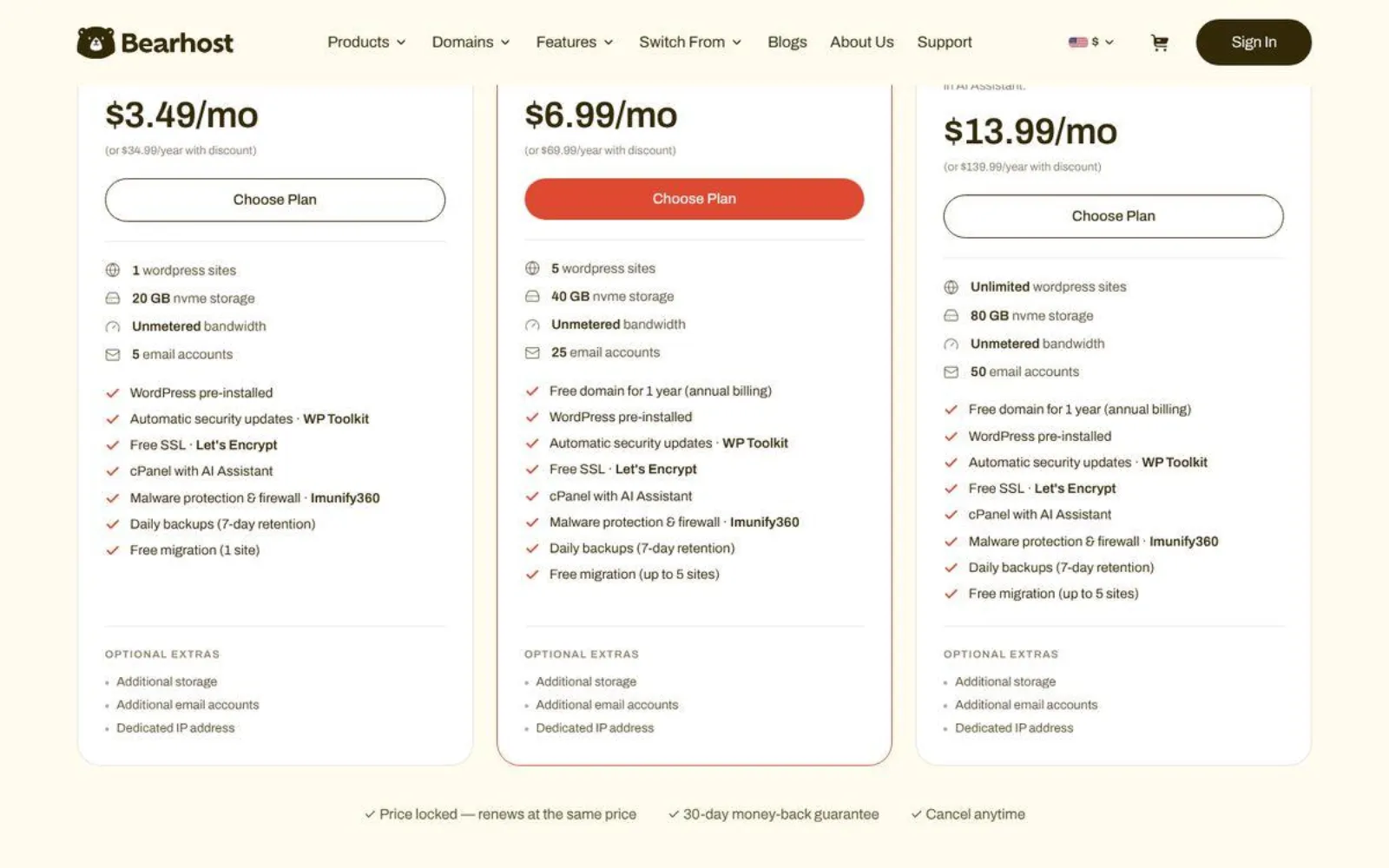
BearHost WordPress hosting Cub plan gives you a ready-to-use WordPress website with 20 GB NVMe storage and 5 email accounts for $3.49 per month. WordPress comes preinstalled, while WP Toolkit handles automatic security updates. You also get free SSL, daily backups with 7-day retention, Imunify360 malware protection, and cPanel with a built-in AI Assistant.
You can pay monthly at $3.49 without committing to a year or more upfront. There is also an annual promotion code "WPFIRSTYEAR" to pay just $19.99 for your first year. It then renews at $34.99 per year, and that regular price stays the same. Both options come with a 30-day money-back guarantee.
Need to move an existing website? BearHost includes free migration for one site on Cub. You can also purchase additional storage, email accounts, or a dedicated IP as your needs change.
You can manage everything in cPanel, which includes a built-in AI Assistant to help with common tasks.
BearHost WordPress plans
| Plan | Websites | NVMe storage | Mailboxes | Monthly price |
|---|---|---|---|---|
| WordPress Cub | 1 | 20 GB | 5 | $3.49 |
| WordPress Bear | Up to 5 | 40 GB | 25 | $6.99 |
| WordPress Grizzly | Unlimited | 80 GB | 50 | $13.99 |
The main limitation is that Cub supports only one website, and this tier does not include a free domain. You will need to register your domain separately. For a free domain and more website allowance, you need the Bear plan, which costs only $6.99/mo flat with a 40 GB NVMe.
Best if: You want WordPress hosting with automatic updates, daily backups, and professional email without locking yourself into a long subscription or worrying about renewal price hikes.
2. Hostinger: low intro price, long prepayment
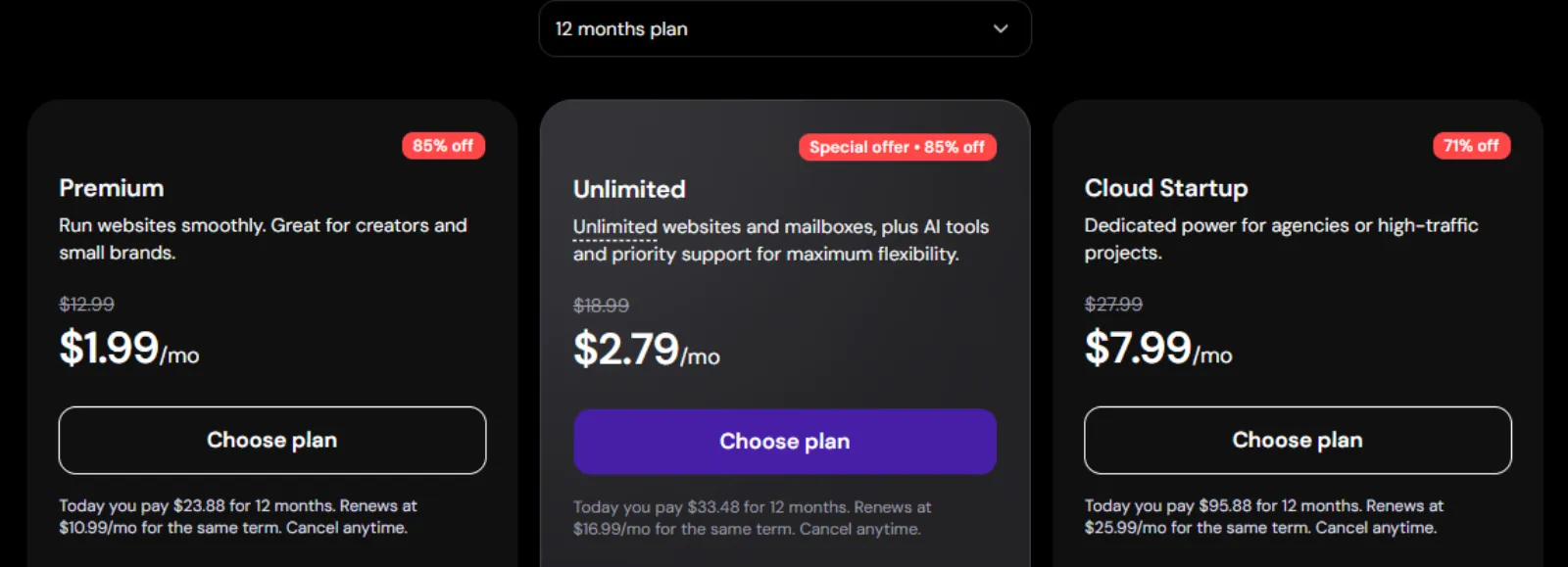
Hostinger's Premium plan supports three websites with 20 GB SSD storage, weekly backups, free SSL, CDN, and a free domain for the first year. You pay $1.99 per month, or $23.88 upfront for 12 months. Renewal costs $10.99 per month.
The main limitation is the renewal increase. You also get SSD rather than NVMe storage, and backups are weekly rather than daily. BearHost gives you the same 20 GB storage capacity on NVMe, with daily backups and no monthly renewal increase.
Best if: You want to host up to three websites at a low first-year cost and don't mind paying more at renewal.
3. Bluehost: WordPress.org's long-time recommendation
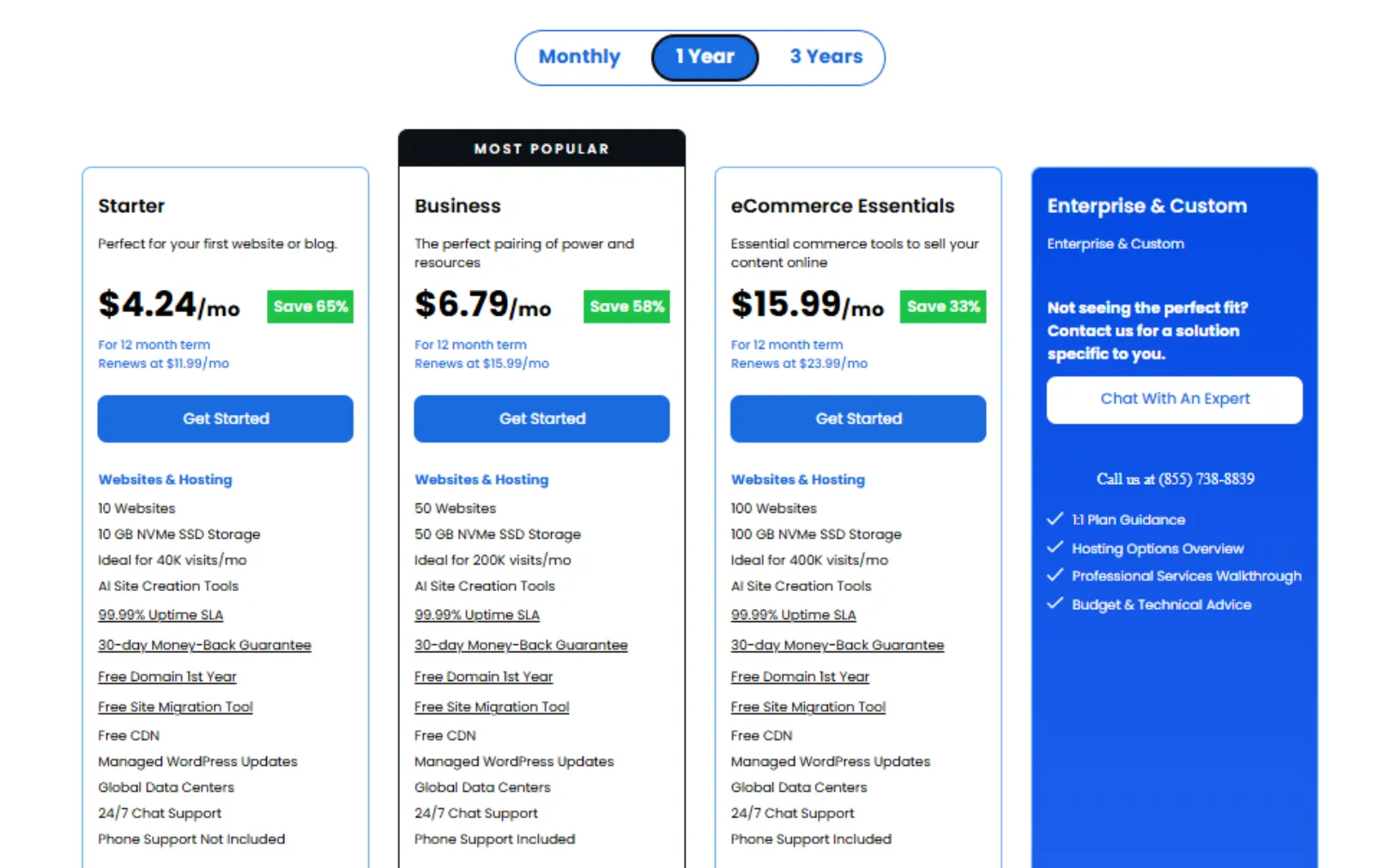
Bluehost's Starter plan supports 10 websites on 10 GB NVMe storage. You also get a free domain for the first year, weekly backups, free SSL, staging, and AI website creation tools. The first year costs $4.24 per month, or $50.88 upfront. Renewal rises to $11.99 per month.
The main limitation is storage. Ten websites share just 10 GB, and backups are weekly. BearHost's entry Cub plan gives you 20 GB of NVMe storage, daily backups, and five email accounts for just $3.49 per month.
Best if: You want to manage several websites under one account and value Bluehost's beginner tools.
4. SiteGround: excellent support, expensive renewal
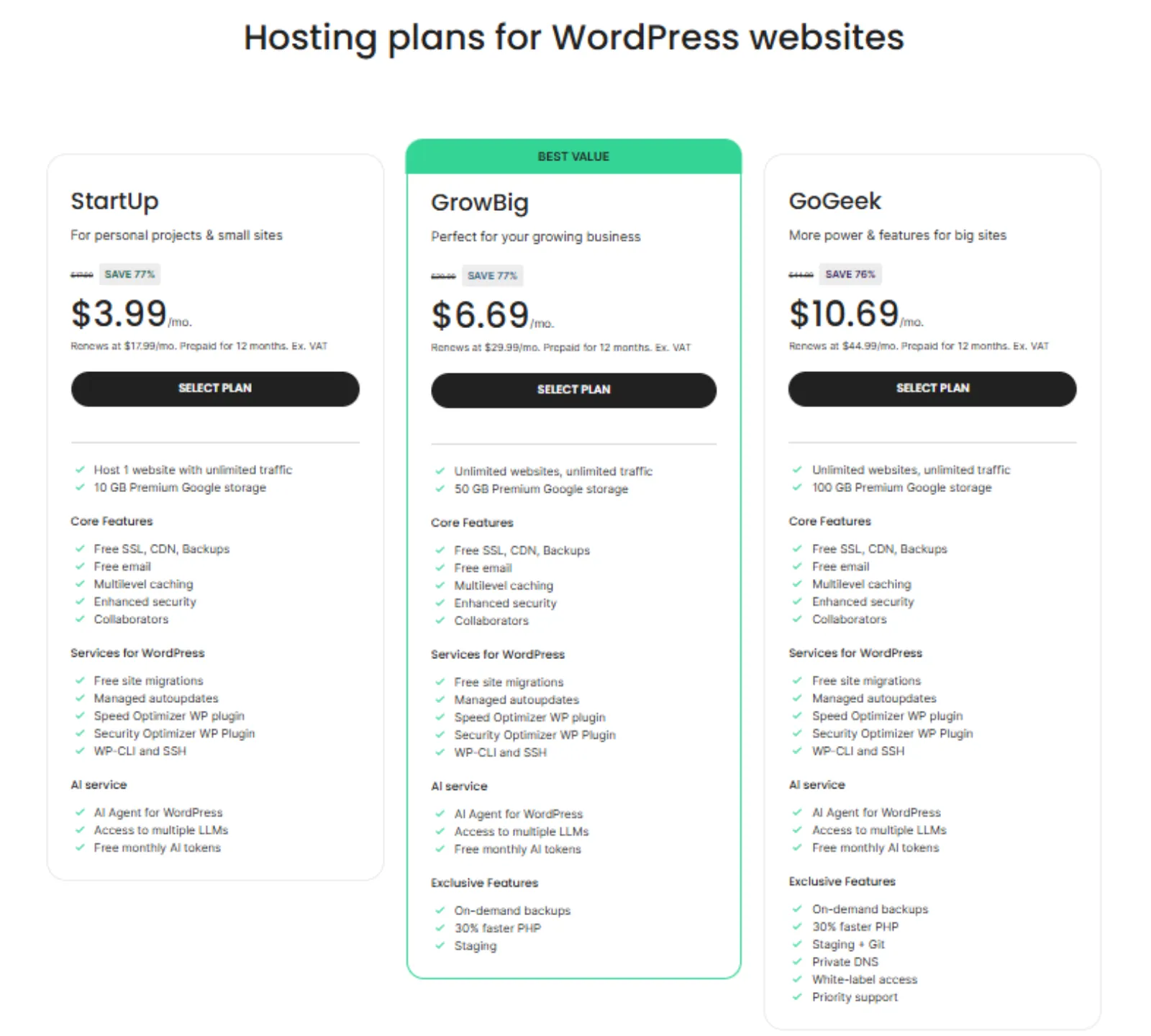
SiteGround's StartUp plan gives you one website, 10 GB Premium Google storage, free SSL, CDN, email, daily backups, and managed WordPress updates. You also get its Speed Optimizer and Security Optimizer plugins. The first year costs $3.99 per month, or $47.88 upfront. Renewal increases to $17.99 per month.
The biggest drawback is the renewal price, which is more than four times the introductory rate. You also get only 10 GB of storage, compared with BearHost's 20 GB NVMe on Cub. Plus, SiteGround's StartUp plan does not include staging.
Best if: You value SiteGround's WordPress tools and support and can budget for the higher renewal.
5. DreamHost: many sites and daily backups for the long term
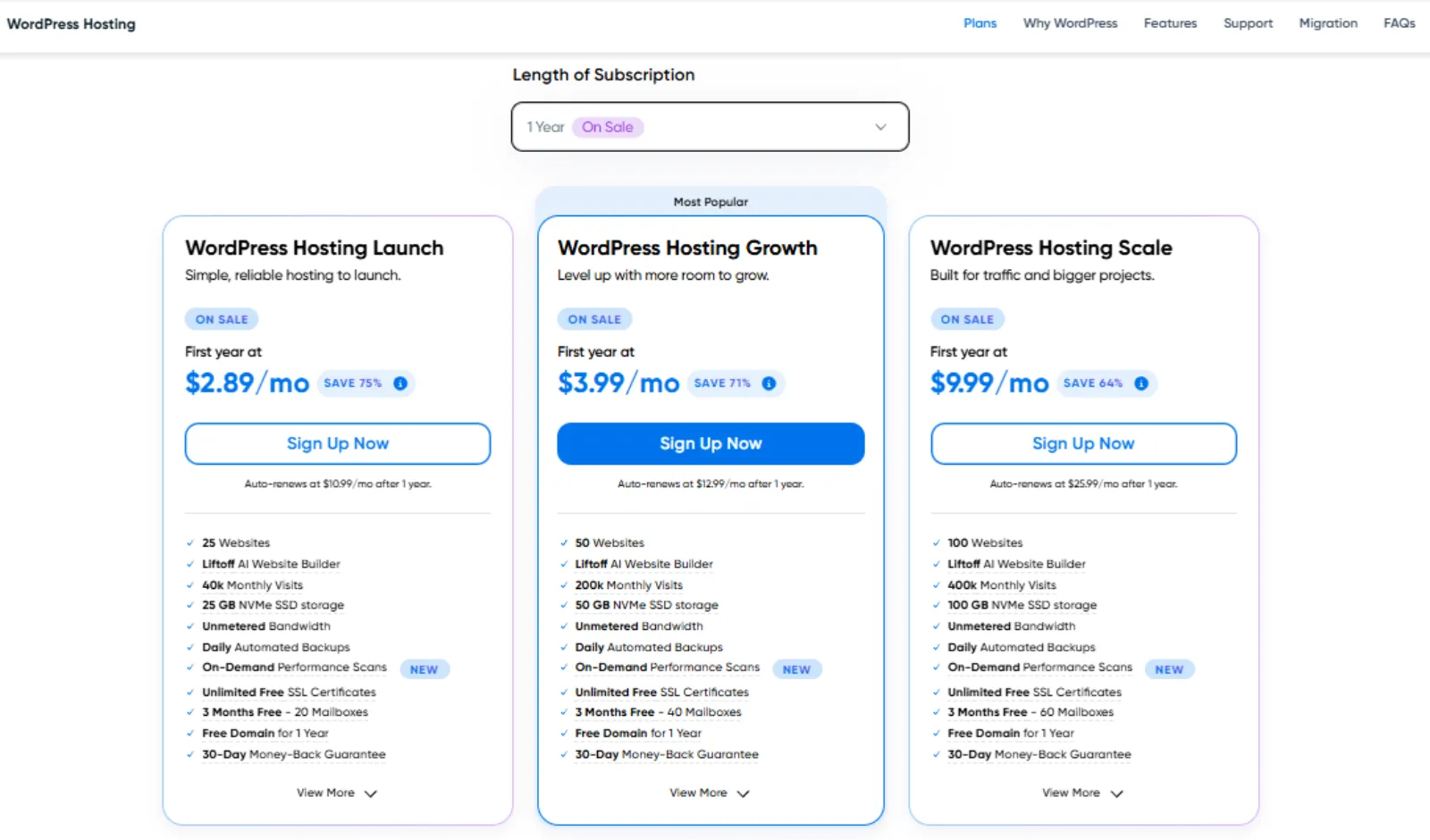
DreamHost's Launch plan supports up to 25 websites on 25 GB NVMe storage. It includes daily automated backups, unmetered bandwidth, a free domain for the first year, and a three-month email trial with 20 mailboxes. You pay $2.89 per month, or $34.68 upfront for the first year. Renewal costs $10.99 per month.
The main limitation is the renewal increase and the temporary email offer. You'll need to pay separately for email after the first three months. BearHost includes email accounts and daily backups without that short trial period.
Best if: You want to host several websites with daily backups and don't mind paying more for email later.
6. Namecheap EasyWP: the cheapest simple yearly option
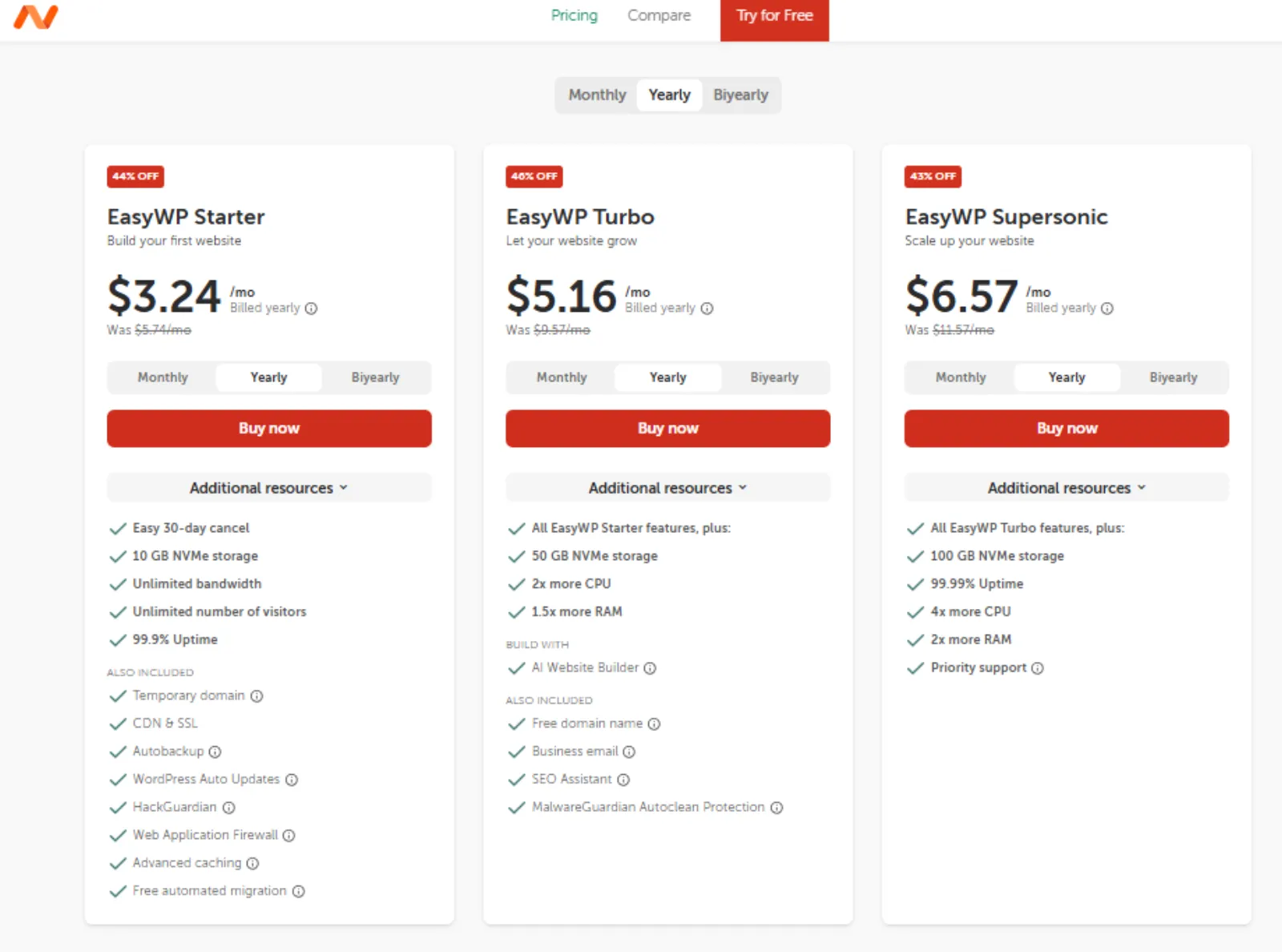
EasyWP Starter is designed for one WordPress website. It includes 10 GB NVMe storage, free CDN, SSL, and automatic daily backups. The annual offer costs $38.88 upfront, equivalent to $3.24 per month. Renewal increases to $68.88 per year.
The main caveat is that the plan supports only one website and does not include email hosting on your domain. BearHost Cub gives you 20 GB NVMe storage and five email accounts for $3.49 per month, with a fixed renewal price.
Best if: You need straightforward WordPress hosting for one small website and prefer annual billing.
What beginners really pay: checkout vs. after the introductory term
The monthly price on a hosting page is not always what you pay upfront. Some hosts charge for the entire year, while others let you pay monthly. The bigger difference often comes at renewal.
Here's what each plan costs during the first year and what you'll pay afterward.
| Host | Paid at checkout | Covers | Annual cost after the introductory term |
|---|---|---|---|
| BearHost WordPress Cub | $3.49 monthly or $19.99 with annual promo | 1 month or 12 months | $34.99/year with discount ($3.49/mo if paying monthly) |
| Namecheap EasyWP Starter | $38.88 | 12 months | $68.88 |
| SiteGround StartUp | $47.88 | 12 months | $215.88 |
| Hostinger Premium | $23.88 | 12 months | $131.88 |
| DreamHost Launch | $34.68 | 12 months | $131.88 |
| Bluehost Starter | $50.88 | 12 months | $143.88 |
BearHost gives you a choice. You can pay $3.49 monthly without a long commitment, or use code WPFIRSTYEAR to pay $19.99 for the first year. The annual plan renews at $34.99, and that regular price never increases. Namecheap also offers annual billing, but its renewal rises from $38.88 to $68.88.
Your first hour: set up a WordPress site on BearHost
You can have your first WordPress website running within an hour, even without technical experience.
1. Choose WordPress Cub. Visit BearHost WordPress hosting and select monthly billing at $3.49 or annual billing. Use code WPFIRSTYEAR for the $19.99 first-year offer.
2. Connect your domain. Register a new domain or point one you already own. See how to register a domain name.
3. Log in to WordPress. WordPress is preinstalled. Open it through cPanel's WP Toolkit. To set up another installation, follow our guide on installing WordPress in 5 minutes.
4. Pick a theme. Go to Appearance, then Themes, and choose a free design for your website.
5. Create your email. Set up an address such as name@yourdomain.com in cPanel. See how to create a professional email account.
6. Check your SSL. BearHost issues free SSL automatically, which allows visitors to access your website over HTTPS.
Not sure WordPress is right for you? Read our comparison of website builders vs WordPress to see whether building your site from scratch is better.
Frequently Asked Questions
Conclusion
Every host here can get your first WordPress website online. The difference is what you get for your money and how much your hosting costs after the introductory offer. Hostinger, DreamHost, and Bluehost offer low first-year prices, but their monthly rates rise to $10.99, $10.99, and $11.99, respectively, at renewal. SiteGround has the steepest increase, going from $3.99 to $17.99 per month. Namecheap is another option for a single website, but its annual renewal rises from $38.88 to $68.88. BearHost gives you more predictable costs. WordPress Cub includes 20 GB NVMe storage, automatic updates, daily backups, free SSL, five email accounts, and free migration. You can start at $3.49 per month, with no increase at renewal, or pay $19.99 for the first year using WPFIRSTYEAR. The annual renewal is $34.99, and that price stays the same. Every plan also comes with a 30-day money-back guarantee. Ready to launch your first website? Explore BearHost's WordPress hosting plans.